AI日志监控检测到”PC死机导致的账户锁定”的案例

AI日志监控检测到”PC死机导致的账户锁定”的案例

< 1 min read

2026.04 / Tech Blog / BASTION

AI Log Monitoring Detected “Account Lock Caused by a Hung-up PC” #

BASTION’s Windows client monitoring detected an abnormal lockout of an in-house human account. A Slack message identified the source IP, and investigation revealed the cause was a hung-up device. From detection to root cause identification: 5 minutes.

What Happened #

An unfamiliar line appeared in BASTION’s periodic analysis report.

Failed accounts: svc-ldap=203, DC-01$=194, SV-01$=24, admin-user=13
Locked accounts: svc-ldap=225, DC-01$=224, SV-01$=33, admin-user=16

The issue was admin-user. This is a human account. It has been locked out 16 times. I had no idea what could have caused this.

Why this matters: When a human account experiences repeated lockouts, it may indicate a password brute-force attack. It’s necessary to check the source IP to determine whether this is an external attack or an internal device issue.

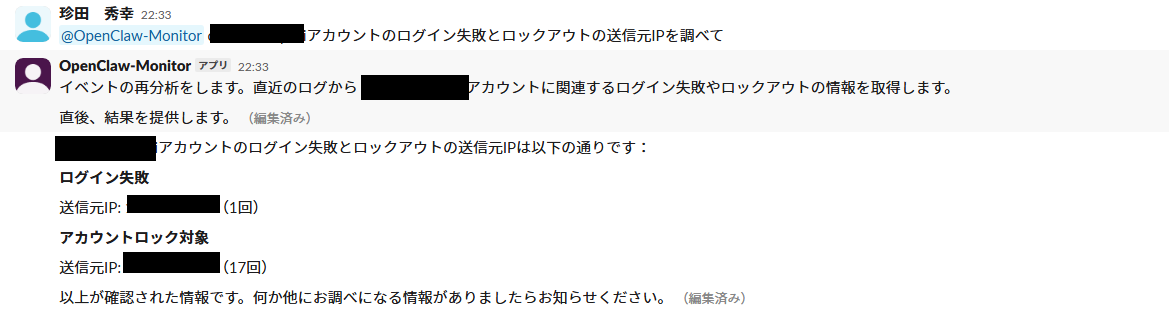
Identifying the Source IP via Slack #

BASTION has a feature that allows you to direct analysis interactively via Slack.

Root Cause #

Upon checking the device at the source IP, Windows 11 was in a hung state.

Even when a hung device has its screen frozen, it continues to send authentication requests to AD in the background. If old cached credentials exist after a password change, authentication fails each time, and the account eventually gets locked out.

After rebooting the device, the lockouts stopped.

A Typical Pattern #

“Account lockout caused by a hung-up device” is a common issue in IT operations. However, traditionally only the “locked out” event would be reported to the help desk, and identifying the source device required manual investigation of AD event logs. BASTION automates detection and source IP identification, and the entire process is completed with a single Slack question.

How BASTION Detected This #

1. Windows Client Log Collection #

Windows clients in our organization have NXLog (an open-source log forwarding agent) automatically deployed via GPO. Event logs (Security, System, Application, PowerShell, etc.) from each device are forwarded to the BASTION server in syslog format.

On the BASTION server side, rsyslog automatically creates directories for each hostname and stores logs. The moment a new device starts sending logs via NXLog, it automatically enters the monitoring scope. Manual device registration is not required.

2. Automatic Device Classification #

When a new host appears, BASTION’s LLM reads log samples and automatically determines “this device is a Windows client” or “this is a Linux server.” Based on the classification result, appropriate monitoring templates are automatically applied.

For Windows clients, the following items are automatically placed under monitoring.

Category Monitoring Item
Authentication Anomalies Login failure spikes, account lockouts, privileged logons, off-hours logins
Process Execution PowerShell EncodedCommand, downloader patterns, LOLBin execution
Devices USB mass storage device connections
Account Changes User creation, admin group additions, service installation, task creation

3. Detecting Anomalies Through Periodic Analysis #

Every 15 minutes, periodic analysis runs where the LLM reads summaries of all hosts and judges anomalies. In this case, “human account locked out 16 times” was judged to have medium or higher severity, and a detailed report was automatically sent to Slack.

4. In-Depth Analysis Through Interactive Inquiry #

After seeing “admin-user=16 lockouts” in the periodic report, simply mentioning the alert in Slack completed the source IP identification. No need to manually search through AD event logs.

Lessons from This Case #

False Positive Exclusion Rules Are 90% About What to Exclude #

If we hadn’t excluded svc-ldap (LDAP integration) and DC-01$ (Kerberos computer accounts), hundreds of “anomalies” would have been reported each time, and the 16 incidents on the human account would have been buried in the noise. By eliminating noise, true anomalies stand out.

The Value of “Detection → Notification → Investigation” All Happening Within Slack #

The traditional workflow was “open AD Event Viewer → filter for event 4625 → narrow down by account name → find source IP,” which takes over 10 minutes even for experienced users. With BASTION, detection is performed automatically by cron, and investigation is just asking a question in Slack. The entire process is completed with zero screen transitions.

Client Monitoring Starts with Just “Pointing Syslog” #

After deploying NXLog via GPO and configuring the syslog destination, all client PCs are automatically placed under monitoring. BASTION reads the log content, automatically determines the device type, and applies the appropriate monitoring template. There is no need for manual human intervention as devices are added or removed.

Summary #

BASTION’s Windows client monitoring detected an abnormal account lockout in our own environment. From detection to identifying the source device: approximately 5 minutes. All we did was ask one question in Slack.

The cause was a mundane hung-up device, but the same detection mechanism also works against external brute-force attacks. Whether the source IP is internal or external only changes how we respond; the detection and identification workflow remains the same.

BASTION is a service that delivers AI security monitoring in closed environments.

BASTION Service Page
Contact

Updated on 2026年6月9日

What are your feelings

  • Happy
  • Normal
  • Sad