
Just point syslog and AI automatically determines device type to start monitoring #
The moment a new device starts sending syslog, the LLM reads the log sample and automatically determines “this is a Windows client” or “this is a firewall”. It applies the appropriate monitoring template and begins monitoring immediately. No manual device registration required.
The most tedious part of traditional monitoring deployment #
When deploying a monitoring tool, the work that takes the most effort is not the initial setup but rather “device-by-device registration work”.
Whether with Zabbix or other SIEMs, every time you add a new device to monitoring, you need “host registration → template selection → parser configuration → testing → production deployment”. For 10 devices, that’s 2-3 person-days; for 100 devices, 20-30 person-days. And this work repeats every time devices are added or removed.
BASTION eliminates this entire step.
Complete picture of the mechanism #
The following 5 steps run entirely automatically.
| Step | What it does | When it runs |
|---|---|---|
| 1. Log arrival | New device sends syslog. rsyslog automatically creates a directory by hostname | Immediate |
| 2. New host detection | Compare with previous host list and discover new directories | Once per day (cron) |
| 3. LLM classification | Send log sample to LLM and automatically determine device type | On new detection |
| 4. Template application | Register appropriate monitoring template in device registry based on classification result | On classification completion |
| 5. Monitoring start | Template is automatically invoked in next periodic analysis (every 15 minutes) | On next cron execution |
In other words, monitoring reports arrive in Slack as soon as 15 minutes after the device starts sending syslog.
Step 1: Automatic directory generation by rsyslog #
BASTION’s rsyslog automatically creates a directory for each sending host based on the hostname of received syslog.
/var/log/remote/
  Hostname-A/2026/04/Security-Auditing.log
  Hostname-B/2026/04/sshd.log
  Hostname-C/2026/04/filterlog.log
  ...
When a new device starts sending syslog, the directory appears without any configuration changes. This is the starting point for all automation.
Step 2: Automatic new host detection #
A detection script runs once per day, comparing the directory list with the previous list.
The key insight here is a counterintuitive approach: instead of managing “what to monitor”, manage “what to exclude”. Existing servers and network equipment (those already handled by individual parsing in summarize.sh) go into an exclusion list, and everything else is treated as “new client”.
# Exclusion list (hostname patterns for servers/NW equipment)
EXCLUDE_HOSTS="existing-server1|existing-server2|existing-fw|..."

# Subtract exclusion list from /var/log/remote/ host list
# → Remaining items are new clients
Slack is notified based on detection results.
| Situation | Notification |
|---|---|
| New host appears | “A new client has started sending logs. Auto-classifying and starting monitoring” |
| Logs stop | “This client has stopped sending logs. Please check NXLog status” |
| Inactive for 48+ hours | “Logs have not been updated for 48 hours or more” |
| No changes | No notification (log only) |
Step 3: Automatic classification by LLM #
This is the core. When a new host is detected, a sample (top 5 files × last 20 lines) is extracted from that host’s log files and sent to the LLM for classification.
What gets classified #
Classification is done into the following 9 categories.
| Category | Device type | Log characteristics (what LLM looks for) |
|---|---|---|
| win_client | Windows client | Security-Auditing, LogonType 2/10, PowerShell |
| win_server | Windows Server | Security-Auditing, Kerberos TGT/TGS, Directory Service |
| linux | Linux server | sshd, sudo, systemd, kernel |
| firewall | Firewall | filterlog, block/pass, NAT, VPN |
| switch | L2/L3 switch | link up/down, STP, loop |
| loadbalancer | Load balancer | backend, frontend, health check |
| webserver | Web server | HTTP status, GET/POST, access_log format |
| router | Router | BGP, OSPF, routing |
| unknown | Cannot classify | Does not match any above → escalates to human |
Classification request to LLM #
A request is sent directly to GPUStack (local LLM server) OpenAI-compatible API. The prompt includes hostname, log file list, and log sample, with instructions to return classification results in JSON format.
# Classification request (overview)
curl -s -X POST "${GPUSTACK_URL}/v1/chat/completions" \
  -H "Authorization: Bearer ${API_KEY}" \
  -d '{
    "model": "qwen2.5-14b-instruct",
    "messages": [{
      "role": "system",
      "content": "You are a device classifier. Classify this host..."
    }, {
      "role": "user",
      "content": "Hostname: XXX\nLog files: ...\nSample: ..."
    }],
    "temperature": 0.1
  }'

# → Response example
{
  "category": "win_client",
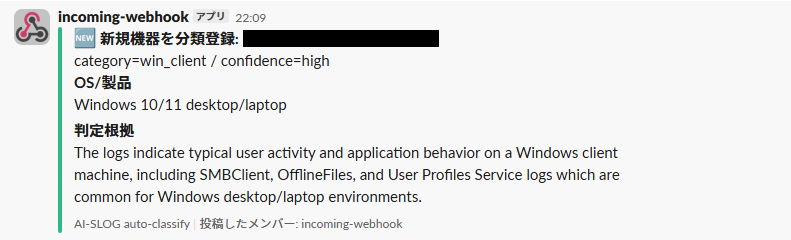
  "confidence": "high",
  "os_detail": "Windows 10/11 desktop",
  "reasoning": "Security-Auditing logs with LogonType 2..."
}
The JSON portion is extracted from the LLM response and registered in the device registry.
Pitfall encountered during implementation: Calling via OpenClaw results in everything being classified as unknown #
Initially, the LLM was being called via OpenClaw (AI agent platform), but keywords like “win_client” and “firewall” in the classification prompt interfered with keyword mapping in AGENTS.md (system prompt), causing the LLM to return tool invocation strings instead of performing classification. The solution was simple: bypass OpenClaw for classification only and call GPUStack API directly with curl. The prompt was also converted to English to eliminate keyword interference.
Another pitfall: bash heredoc and pipe stdin collision #
When writing JSON extraction in Python, bash heredoc (<<'EOF') captured the pipe’s standard input, causing Python’s json.load(sys.stdin) to attempt reading the Python code itself. Always empty classification results were being returned. Moving the Python portion to an external script resolved it. The bug was logically sound but would not run—100% reproducible with no output, and consumed significant debugging time.
Step 4: Template-based monitoring #
Device registry #
Classification results are accumulated in a JSON file (device registry).
{
  "devices": [
    {
      "hostname": "CLIENT-001",
      "category": "win_client",
      "template": "win_client.sh",
      "confidence": "high",
      "os_detail": "Windows 10/11 desktop",
      "active": true
    },
    ...
  ],
  "exclude_hosts": ["existing-server1", "existing-fw", ...],
  "last_scan": "2026-04-21T06:00:00+09:00"
}
Monitoring templates #
Template scripts are prepared for each category. Each template provides two functions.
# templates/win_client.sh

# Summary output (called from summarize.sh)
template_summarize_win_client() {
    # Count authentication anomalies, PowerShell, USB, account changes
}

# Detailed analysis (called from analyze-detail.sh)
template_detail_win_client() {
    # Per-endpoint failed logon details, privileged logon details, LOLBin detection...
}
At the end of the existing summarize.sh (periodic analysis script), a block is added that reads the device registry and dynamically calls templates.
# Appended to end of summarize.sh
jq -r '.devices[] | select(.active==true) | ...' device-registry.json \
| while read HOST CATEGORY TEMPLATE; do
    source "templates/${TEMPLATE}"
    template_summarize_${CATEGORY} "$HOST" ...
done
The existing hardcoded sections remain untouched; only appended sections add new functionality.
Step 5: Fully automatic results #
The first scan automatically detected 14 Windows clients. The LLM read each endpoint’s log sample and determined “Security-Auditing logs contain logon events → Windows client”. The win_client template was automatically applied, and monitoring for 4 categories (authentication anomalies, PowerShell execution, USB connections, account changes) started immediately.
LLM classification accuracy #
Of 14 devices, 13 were correctly classified with confidence: high. One was classified as “win_server” with confidence: high, but was actually a Windows client. This is believed to be caused by the hostname containing text suggestive of a server.
Since win_client and win_server share the same monitoring template, there is no practical impact. However, we are considering an override feature to manually correct the category field in the device registry if category accuracy becomes important.
Coexistence with existing monitoring #
BASTION already has analysis procedures hardcoded in summarize.sh for firewall, authentication infrastructure, load balancer, switch, and web server. The target of automatic classification is the remaining devices after excluding these existing ones.
We do not take the risk of breaking things that already work. In the future, the existing hardcoded portions could also be converted to templates and integrated, but currently a “two-layer structure” exists: “existing equipment = hardcoded” and “new equipment = template auto-applied”.
Future expansion #
Currently there are 2 types of templates: win_client and generic (unknown), but more templates will be added with each customer deployment.
| Template | Status | Main monitoring items |
|---|---|---|
| win_client / win_server | Implemented | Authentication anomalies, PowerShell, USB, account changes |
| generic (for unknown) | Implemented | Count of error/warning/critical |
| linux | Planned | SSH authentication, sudo execution, systemd services, OOM |
| firewall | Planned | Block count, attack source IP, port distribution, VPN |
| switch | Planned | Link down, STP changes, loops, storms |
As the template library grows, the range of devices that can be handled by simply “pointing syslog” expands, and this becomes direct accumulating competitive advantage.
Summary #
BASTION’s automatic device classification performs the following entirely automatically: rsyslog automatic directory generation → host detection → LLM log classification → template auto-application → monitoring start. Just configure the syslog destination, and device type determination, monitoring rule selection, and device change management are all automated.
It is a mechanism that structurally eliminates the greatest bottleneck in traditional monitoring deployment: “per-device registration and configuration”. Whether 10 or 100 devices, human work remains the same (only one line of syslog destination configuration). The problem of “devices ended up outside monitoring without anyone noticing” structurally cannot occur.
BASTION is a service that delivers AI security monitoring in closed networks.


