
Service Renewal Guide
The client portal has a “Manually Renew Service” feature that allows you to issue a service renewal invoice (renewal invoice) at any timing in advance.
Overview #
The client portal has a “Manually Renew Service” feature that allows you to issue a service renewal invoice (renewal invoice) at any timing in advance.
What This Operation Does
When you perform this operation, the next billing date for the target service is updated to “today”, and a renewal invoice is issued.
Prerequisites #
- You must be logged in to the client portal
- You must own the service to be renewed
- You must have permission to issue and pay renewal invoices (varies by contract and permission settings)
Operating Procedures #
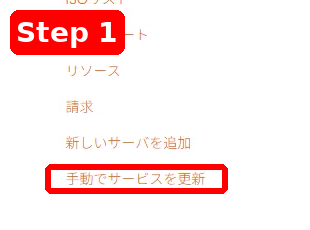
1Open “Manually Renew Service” from the Service Screen #
- Open the Service screen in the client portal.
- Click “Manually Renew Service” from the service menu.
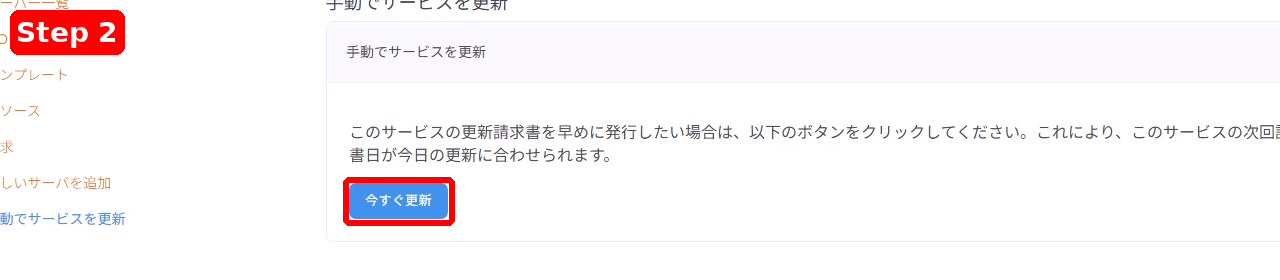
2Click “Renew Now” #
- The “Manually Renew Service” page will be displayed.
- Click the “Renew Now” button on the page.
3Click “OK” in the Confirmation Dialog #
- When the confirmation dialog appears, review the contents.
- If everything is correct, click “OK” (click “Cancel” to cancel the operation).

4Confirm the Issued Invoice and Pay if Necessary #
- When the renewal invoice is issued, you will be redirected to the invoice page.
- The message “A new invoice has been issued” will appear in the upper right corner of the screen.
- Review the details and click “Pay Now!” if you wish to settle immediately.

Important Notes #
- Screen display (invoice number, amount, button display, etc.) may vary depending on your contract details, settings, and language.
- If you accidentally perform this operation or have questions about the billing details, please open a ticket.


