
Building an Automated Infrastructure Log Analysis System with Local LLM #
AI automatically analyzes logs from firewall, authentication infrastructure, switches, load balancers, and web servers every 15 minutes, detecting anomalies, determining severity, and proposing remediation—all via Slack notification. Log data is never sent outside.
Why We Built It #
The motivation was straightforward: we didn’t have time to review logs.
BESTNET-CLOUD runs multiple firewalls, L2/L3 switches, Windows AD, load balancers, and web servers. Each generates syslog output, but it’s unrealistic for humans to manually review all logs daily. We use Zabbix for resource monitoring, but the task of reading syslog content and deciding whether an attack pattern should be ignored or addressed remained human work.
Services like AWS DevOps Agent (GA March 2026) and Azure Security Copilot now offer AI-powered log analysis on the public cloud side. However, these primarily target cloud resources and lack functionality to directly parse and analyze syslog from on-premises physical equipment. Moreover, since log data is transmitted to the cloud vendor’s AI infrastructure, these solutions cannot be used in closed-network environments.
That left us with building it ourselves. Fortunately, local LLM performance has reached practical levels, and all necessary components are available as open source.
System Architecture #
The system is called BASTION—a term meaning fortress or final stronghold, reflecting the vision of protecting infrastructure in closed-network environments.
The architecture is straightforward.
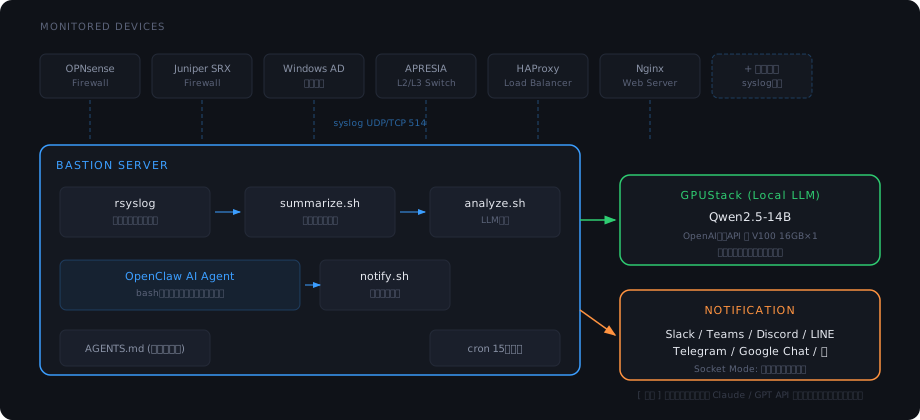
The components used are as follows—all open source or free tier:
| Component | Role | License |
|---|---|---|
| rsyslog | Centralized syslog reception from all devices, saved per-host | OSS (GPL) |
| Shell script suite | Per-device log summarization, parsing, preprocessing | In-house development |
| OpenClaw | AI agent framework (LLM integration, Slack integration, command execution) | OSS |
| Qwen2.5-14B | Local LLM (Japanese log analysis, anomaly detection) | OSS (Apache 2.0) |
| GPUStack | GPU inference server (provides OpenAI-compatible API) | OSS |
| Slack (Socket Mode) | Notifications and bidirectional interaction | Free tier |
Data Flow Details #
1. Log Collection (rsyslog) #
Syslog is received from each device on UDP/TCP port 514 and stored in directories organized by hostname, year, month, and program name.
/var/log/remote/
  fw-primary/2026/04/filterlog.log
  ad-server/2026/04/Security-Auditing.log
  lb-server/2026/04/loadbalancer.log
  ...
2. Log Summarization (summarize.sh) #
Every 15 minutes, cron executes summarize.sh, which extracts events from the past 30 minutes for each device and generates a structured text summary.
Because each device’s log format differs entirely, parsing is written per-device. For example, firewall filterlog uses comma-delimited fields with source IP at position 19 and destination port at position 22. Windows AD logs contain binary data, requiring grep -a. This device-specific knowledge embedded in scripts is the core work of this system.
3. AI Analysis (analyze.sh) #
The summary text is fed to a local LLM (Qwen2.5-14B) via OpenClaw. The prompt instructs: “Determine severity and return detected anomalies and recommended remediation in JSON format.”
Two critical design decisions apply here.
Session isolation: A dynamic session ID is generated for each analysis, preventing past conversation history from contaminating the context. LLMs can be influenced by prior results and drift in judgment, so we ensure fresh context for each analysis.
False positive control: Normal operation patterns (Nextcloud LDAP periodic authentication, Kerberos automatic authentication, firewall external scan blocking, etc.) are defined in the system prompt, providing the LLM with exclusion criteria to treat these as noise. We add patterns iteratively during operations.
4. Notification (notify.sh) #
LLM analysis results are sent to Slack with color coding by severity (critical=red, high=orange, medium=yellow, low=green).
For medium and above, a second detailed analysis is automatically sent. This second message includes the top 50 lines of raw logs, allowing operators to confirm both “what happened” and the raw data from the notification alone.
5. Interactive Analysis (Slack bidirectional) #
Apart from scheduled analysis, mentioning @OpenClaw-Monitor firewall analysis in Slack triggers immediate detailed analysis of the specified device. Natural language queries like “Are there signs of VPN authentication?” or “Check if a single IP is attempting multiple attack methods” are supported.
Since OpenClaw can execute bash commands, future expansion to automated remediation—dynamically adding firewall rules, isolating services, etc.—is possible.
GPU Requirements #
Resource consumption is surprisingly modest.
| Item | Consumption |
|---|---|
| Model (Qwen2.5-14B Q4 quantized) | ~9GB |
| KV cache (16K tokens) | ~1–2GB |
| Total | ~10–11GB |
Supported Devices #
| Device Type | Analysis |
|---|---|
| Firewall | Attack block count, attack source IPs, port distribution, VPN errors |
| Authentication (AD) | Login success/failure/lockout, failure source IPs, failed accounts |
| Load Balancer | Per-backend 5xx error rates |
| L2/L3 Switch | Link down, loops, storm detection |
| Web Server | HTTP status distribution, sensitive URLs, 4xx/5xx source IPs |
Any device that outputs syslog can be added to the monitored fleet by adding a parse script. FortiGate, Cisco, Palo Alto, and others are all supported the same way.
Operational Insights #
Use LLM for judgment, scripts for data processing #
Initially, we attempted to feed raw logs directly to the LLM, but it misidentified syslog field positions and calculation errors occurred. LLMs struggle with precise numeric aggregation. Now, parsing, counting, and summarization are handled by shell scripts; the LLM serves only to read the summary and judge “anomaly or normal?” and “what remediation?”.
False positive control grows through operations #
The first week was plagued by false positives. Kerberos computer account periodic authentication to AD generated over 1,000 login success reports, and Nextcloud LDAP integration was flagged as “suspicious login attempts.” Adding each pattern to the system prompt as normal behavior eliminated noise within about two weeks.
Session isolation is essential #
Using sessions directly allows prior analysis results to persist in context, causing the LLM to introduce unnecessary context like “compared to last report…”. Security analysis requires a fresh perspective each time, so we dynamically generate session IDs per analysis.
“Nothing happened” reports have value #
Initially, frequent LOW notifications felt noisy. Over time, we realized these reports assured us “the system is operating normally.” When notifications stop, we detect “the monitoring itself has stopped”—thanks to these regular reports.
Future Plans #
Currently, the flow is “detect → notify.” We plan to extend to “detect → AI judge → auto-remediate.”
Specifically, we will implement automatic blocking of attack source IPs (calling firewall APIs directly), auto-blocking on brute force detection, and auto-throttling on anomalous resource use. We are also exploring a hybrid configuration where BASTION receives alerts from existing monitoring systems (Zabbix, AWS CloudWatch, Azure Monitor) via webhook, performs cross-system AI analysis, and executes automated remediation.
Summary #
We realized automated infrastructure log analysis using local LLM (Qwen2.5-14B) + GPUStack + OpenClaw + rsyslog + shell scripts. It runs on one V100 16GB GPU, log data never leaves the environment, and monthly operating cost is GPU electricity alone.
All components are open source, so anyone can reproduce the architecture. However, achieving full operation requires device-specific log parsing, accumulating false positive patterns, and tuning system prompts—non-trivial work and operational knowledge.
BASTION is currently running 24/7 in production on BESTNET LLC’s own infrastructure (BESTNET-CLOUD).
Interested in AI-powered security monitoring for closed-network environments? Feel free to reach out.
BASTION Service Page Contact


